Bollinger Bandwidth Indicator with Moving Average for MT4 & MT5
September 23, 2026
The Bollinger Bandwidth Indicator is a MetaTrader tool that converts the distance between the upper and lower Bollinger Bands into a clean volatility oscillator below your chart. It helps traders spot volatility squeezes, band expansion, and potential momentum shifts using a separate sub-window reading, with an optional moving average plotted directly on the Bandwidth line.
If you already use Bollinger Bands, this indicator gives you a more precise way to measure whether the market is compressing, expanding, or losing volatility momentum.
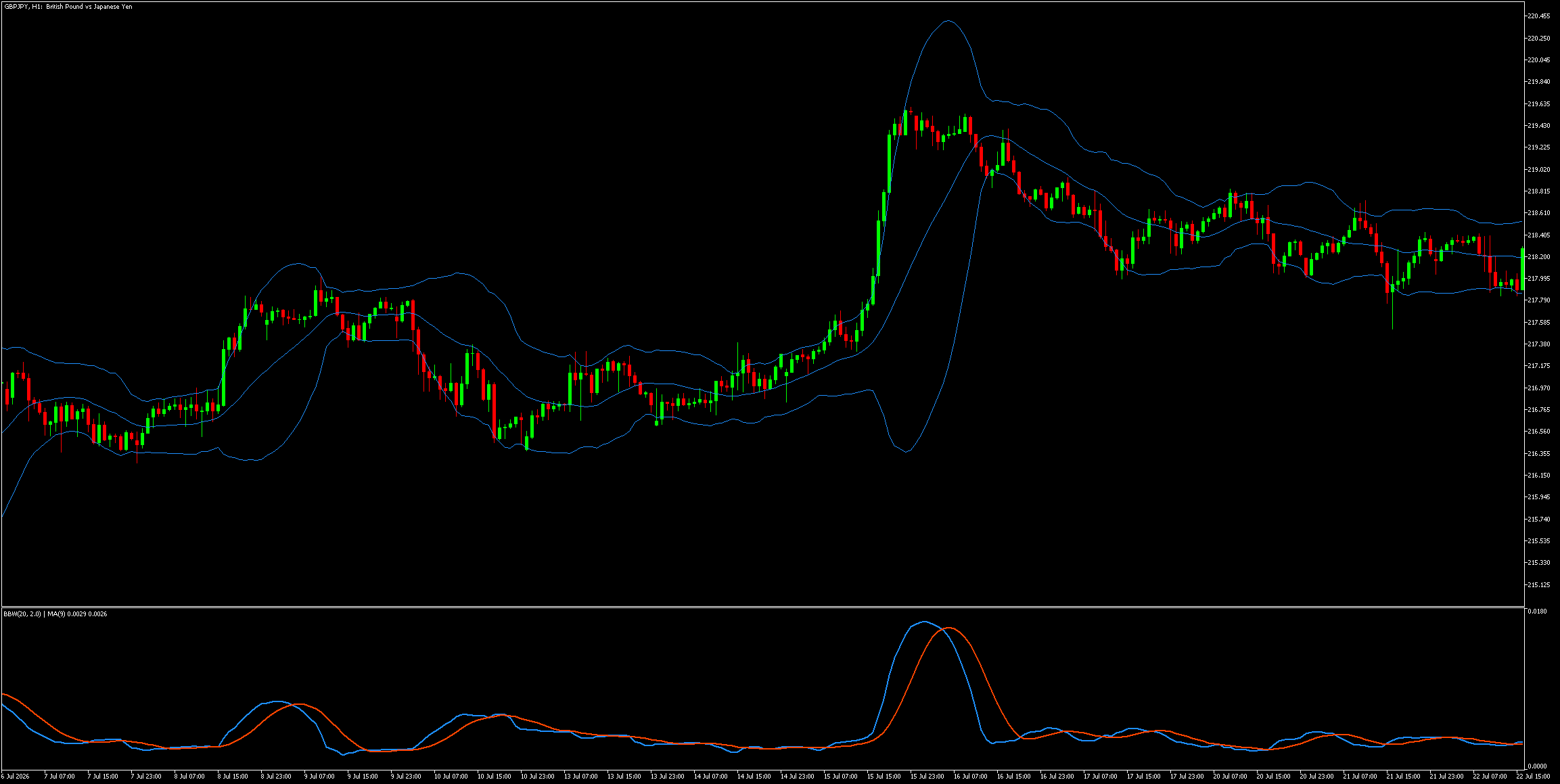
GBPJPY H1: The Bollinger Bandwidth Indicator plots the Bandwidth in a sub-window below the main Bollinger Bands, with an optional moving average to help identify volatility expansion and contraction.
What Is the Bollinger Bandwidth Indicator?
Bollinger Bandwidth Indicator is a volatility tool that measures the gap between the upper Bollinger Band and the lower Bollinger Band, then plots that measurement as a single oscillator line. Instead of judging volatility only by how wide the bands look on the main chart, the indicator turns that distance into a readable value that can rise, fall, flatten, or cross its own moving average.
The calculation uses the standard Bandwidth formula:
Bandwidth = (Upper Band - Lower Band) / Middle Band
How Does the Bollinger Bandwidth Oscillator Work?
Bollinger Bandwidth oscillator works by translating the width of the Bollinger Bands into a separate volatility reading below the price chart. When the bands widen, the Bandwidth value rises. When the bands contract, the Bandwidth value falls.
In practical terms:
Rising Bandwidth suggests volatility is expanding.
Falling Bandwidth suggests volatility is contracting.
Low and flat Bandwidth can indicate market compression.
A sharp Bandwidth increase often appears when breakout momentum enters the market.
Because the value is normalised against the middle band, it is easier to compare volatility behaviour across different instruments and timeframes. This is why many traders use the Bollinger Bandwidth oscillator as a volatility filter rather than as a standalone entry signal.
How to Use the Bollinger Bandwidth Moving Average
Bollinger Bandwidth moving average helps filter Bandwidth readings by comparing the current volatility level with its recent average. The indicator includes a built-in moving average option, so you can plot the MA directly on the Bandwidth line without adding a separate indicator.
A simple way to interpret it is:
Bandwidth above its moving average: volatility is stronger than the recent norm.
Bandwidth below its moving average: volatility is weaker than the recent norm.
Bandwidth crossing above its moving average: possible volatility expansion trigger.
Bandwidth crossing below its moving average: possible volatility cooldown.
This can be especially useful for breakout traders. For example, if price breaks out of a consolidation area and the Bollinger Bandwidth line moves above its moving average, it can suggest that the move has volatility support behind it.
Bollinger Bandwidth Indicator chart setup is easiest when the main Bollinger Bands stay on the price chart and the Bandwidth oscillator sits in the sub-window below. This keeps your main chart clean while giving you a dedicated volatility panel underneath.
A recommended setup is:
Add the built-in Bollinger Bands indicator to the main chart.
Add the custom Bollinger Bandwidth Indicator to a sub-window.
Match the Bollinger Band settings in both indicators.
Enable or disable the Bandwidth moving average depending on your preference.
Frequently Asked Questions About Bollinger Bandwidth
Bollinger Bandwidth FAQ answers common questions about free downloads, MT4 and MT5 compatibility, moving average settings, and how the oscillator works alongside Bollinger Bands.
Is the Bollinger Bandwidth Indicator free to download?
Bollinger Bandwidth Indicator free download is available on this page for both MT4 and MT5 users. After downloading the correct file, install it in your MetaTrader Indicators folder and apply it to a chart.
Does the Bollinger Bandwidth Indicator work on MT4 and MT5?
Bollinger Bandwidth Indicator compatibility includes both MT4 and MT5. Each platform has its own download because MetaTrader 4 and MetaTrader 5 use different indicator formats and calculation structures.
Can I hide the Bandwidth line or the Bandwidth moving average?
Bollinger Bandwidth Indicator visibility controls allow you to show or hide the Bandwidth line and the Bandwidth moving average separately. This lets you display the oscillator alone, the moving average alone, or both together.
What is the best setting for the Bollinger Bandwidth moving average?
Bollinger Bandwidth moving average settings often start well with a 9-period SMA, but the best value depends on the timeframe, instrument, and whether you prefer faster signals or smoother volatility filtering.
Does the Bollinger Bandwidth Indicator replace Bollinger Bands on the main chart?
Bollinger Bandwidth Indicator is designed as a sub-window oscillator, so it does not replace the main Bollinger Bands on the price chart. For the full setup, use the built-in Bollinger Bands indicator on the main chart and this indicator below it.
We use cookies to analyze website traffic and improve your experience. By clicking "Accept," you agree to our use of cookies for analytics purposes. Learn More